
Atenvia PRD v0.1
Discovery decisions · 25 November 2026
Start with one pilot clinic. A doctor signs in, finds a case they are authorised to see and downloads the source report. Easmed needs a record of doctor sign-ins. Pam and Fatley have mapped the operational steps and fields. Walk one case through that flow with them before changing it.
Use Zoho CRM for the patient handoff. Assess Somfit for sleep-test reports and Löwenstein prisma CLOUD for CPAP data. Easmed still needs to choose the first report source and confirm access and patient matching. ResMed, Itamar and appointment scheduling can wait.
Gary and Ervin need to agree the first release and the capacity available after Snoraire beta sign-off. Raena proposed concentrating discovery in December and completing scope and access work by mid-January. The same discussion placed engineering after Chinese New Year and floated a late-January or early-February launch. Those dates conflict. A delivery date needs a named build team and an agreed start.
23 November scoping discussion · 24 November roadmap discussion
23 November 2026 · Draft for Easmed review
Checkpoint 2026-11-23-atenvia-prd-v0.1-expanded · First-slice
approval · EAS-13 · Planning
handover · EAS-16
Product outcome
A doctor finds an authorised case and downloads the correct source PDF. Easmed can review doctor sign-in records.
- 1Singapore pilot clinic
- 1Doctor-facing role
- 1Report source
Proposed first release. Read-only cases, a one-way
Zoho handoff and one report source. Test the flow against one real case
with Pam and the pilot clinic.
Scope decisions. Doctor assignment or clinic/location
access, grant analytics, and staff-confirmed PDFs or a vendor
path.
Later. Scheduling, patient accounts and sharing,
generated reports, wider dashboards, multi-vendor ingestion and CRM
writeback.
Pilot journey and interface states
- Sign inNamed account
- Open a caseAuthorised cases only
- Check report statusPending or released
- Download PDFCurrent source version
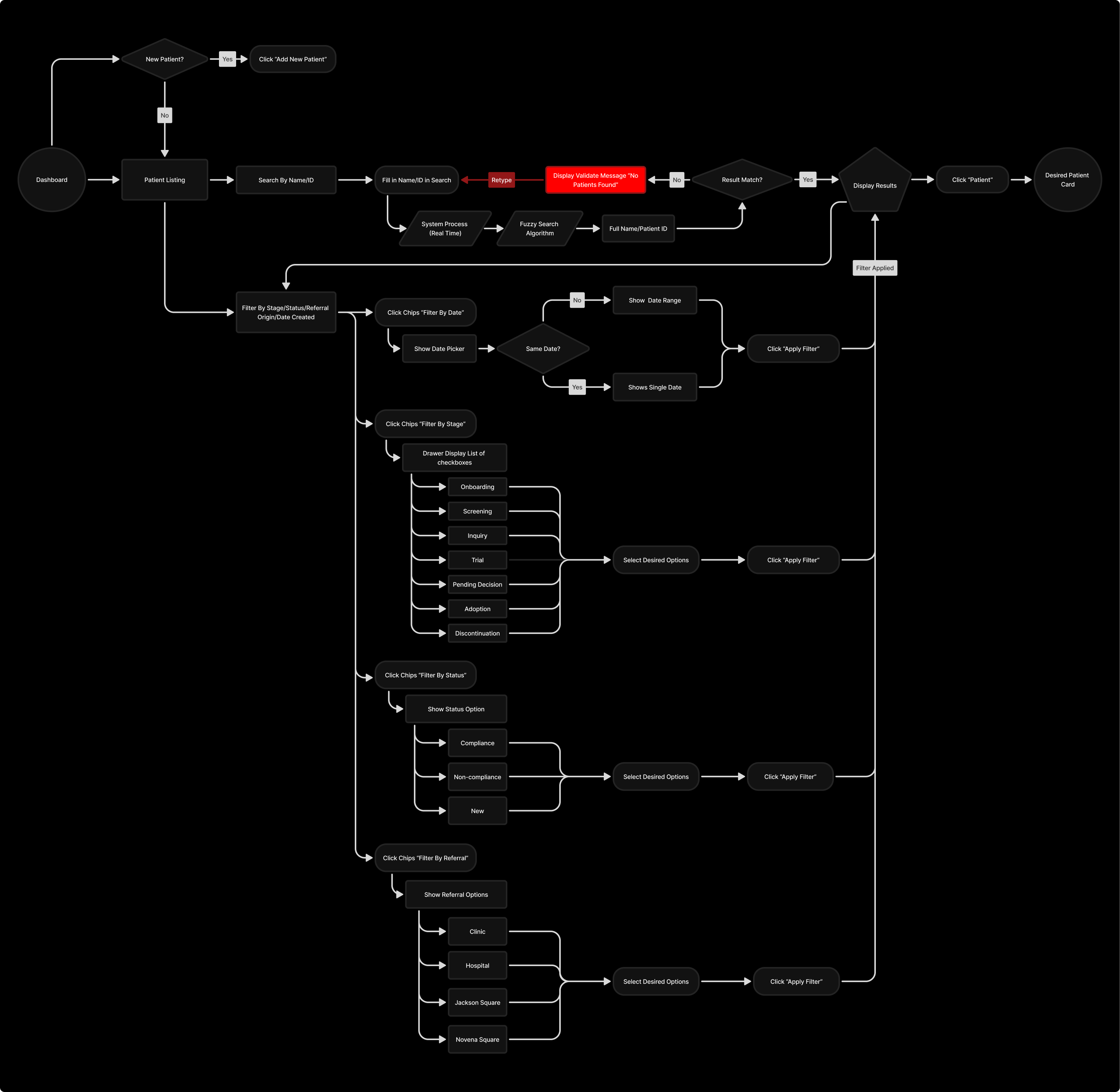
Broader design reference. The pilot starts with authorised search and case access.
Patient Listing in Figma · Full-size export
Other flows · Patient Card · Signup / Sign-in · Patient WhatsApp
Expand user flowCollapse user flow
| Surface | States to cover |
|---|---|
| Sign-in | Invitation pending, authenticating, generic failure, expired session, revoked account. |
| Case list | Loading, empty, available, temporary failure. Search and summaries stay in scope. |
| Case and PDF | Pending, released, unavailable or access removed. Show a retry or support route where appropriate. |
| TAS handoff | Awaiting match, held, released, superseded. Retain correction history. |
Requirements and proposed acceptance
| ID | Requirement |
|---|---|
| R1 · Sign-in and audit | Named, invite-only doctor accounts. Record sign-in time, account when known and outcome. An authorised reviewer can retrieve the agreed period. |
| R2 · Read-only access | Show approved case fields and report status only. Enforce the signed case permission on the server for list, search, detail and every download. |
| R3 · Source PDF | Release only after an operator confirms the patient and clinic match. Serve the current source version. Prevent new downloads after access is revoked or a version is superseded. |
| R4 · Safe handoff | Import approved Zoho fields. Record source, match and correction. Duplicate delivery leaves one record and ambiguous matches stay held. |
Roles. The doctor reads authorised cases. A named TAS operator matches, releases and corrects reports for assigned pilot cases. A designated Easmed reviewer reads approved audit events. A named account admin and backup provision and revoke accounts. Agree whether report release needs a second reviewer.
Workflow and data handoff
- Zoho owns confirmed patient and case context. Pam, Fatlee and the CRM administrator confirm modules, stable IDs and permitted read-only access. Decide the update method after reviewing a sample.
- TAS confirms matches, releases the approved source file and handles exceptions. Compare staff-confirmed PDFs with an authorised vendor path. The prisma CLOUD guide and offered demo support discovery. Tenant rights and report retrieval are still open. API register
Minimum data model
| Record | Minimum proposal |
|---|---|
| Membership | Clinic or approved location ID, account ID, role and membership state. |
| Case | Atenvia key, Zoho case/referral and patient IDs, clinic and assignment keys, visibility status. Use stable IDs for matching. |
| Report | Case key, source report ID and type, version, release status/time and protected file reference. Keep referral origin separate from report vendor. |
| Handoff | Source reference/version, match outcome, receipt time, confirmer and correction. |
| Audit | Time, actor where known, type, outcome and minimum target reference. Cover sign-in, denied access, release/correction and download. |
Security and quality
- Access. Deny by default. Agree MFA, session expiry, revocation and cross-domain behaviour with the identity and privacy owners.
- Data. Approve region, encryption, backups, retention and erasure. Keep patient-linked data out of browser search history, session replay, routine logs and analytics. Use synthetic test data unless a separate workflow is approved.
- Usability and recovery. Verify keyboard and narrow-screen use. Agree page and download timings with a representative pilot load. Give TAS a retry, correction and escalation route.
Acceptance tests and pilot evidence
Proposed. Record the build, environment, role and redacted result for each synthetic run.
| ID | Pass condition and evidence |
|---|---|
| AC-1 · Sign-in audit | Reviewer sees one success and one failure. A second role is refused. Retain the audit readback. |
| AC-2 · Case isolation | A permitted account sees its case. A second account gets no case or identifying metadata through the list, direct detail or download. Test same-clinic isolation if individual assignment is chosen. |
| AC-3 · PDF and revocation | The current source version downloads. Pending and superseded versions are refused. A saved link fails after access is revoked. Retain version and download audit results. |
| AC-4 · Match and replay | A correct match releases once. Wrong patient or clinic stays held. An approved correction becomes current. Retain the fixture, states and exception owner. |
| AC-5 · Recovery and data | An authorised operator reconciles a failed transfer on retry. Check browser storage, logs and telemetry for absent patient content. |
| AC-6 · Doctor walkthrough | A doctor finds and downloads the correct PDF unaided. Record timing, issues and reviewer feedback. |
Pilot measure. Correct unaided downloads ÷ eligible cases with a released report. Agree the period and target with the clinic. Track time to retrieval and TAS interventions. Pause for wrong-patient exposure or a report mismatch.
Delivery sequence and handover
- Current engagementDiscoveryAgree scope and access
- After commissioningSecure foundationSign-in, roles and audit
- After foundationOne report pathVerify handoff and access
- After staging acceptanceSupervised pilotClinic and Easmed go/no-go
| Gate | Exit evidence |
|---|---|
| Discovery | Observed workflow, scope and permission decisions or deferrals, grant evidence, access position and build-resource recommendation. |
| Secure foundation | Approved architecture and an exact staging build with sign-in, denied cross-scope access and audit evidence. |
| One report path | Approved handoff, source match, retry, correction and revocation evidence. |
| Supervised pilot | Clinic, TAS and privacy/security go/no-go with named support and pause authority. Record pilot measures and exceptions. |
Easmed commissions the build, names the technical, QA, privacy and operations owners, and confirms Jonas’s capacity. Estimates follow approval and access. June roadmap
Decisions before commissioning
| Decision | What closes it |
|---|---|
| Grant and pilot | Easmed sponsor and Gary confirm the signed requirement, analytics scope, date, clinic and success measure. EAS-11 |
| Roles and workflow | Easmed, Pam and clinic approve individual or clinic/location access, field visibility and the observed workflow. EAS-12 · EAS-13 |
| Data and architecture | CRM and TAS owners confirm the approved sample and report path. Easmed approves identity, hosting, report access and retention. EAS-92 · EAS-118 |
Verification status · 23 November
Available: API desk review (EAS-15), synthetic
fixture (EAS-91), local infrastructure validation (EAS-119), prototype
PDF PR at 5239874 and design references.
Open: Signed grant, observed workflow, permissions,
tenant access, report-path rehearsal, architecture and funded owners.
Kedar is away 26 Nov–3 Dec. Technical
baseline · Selected-path
test
Existing build specs
- Reuse for review: case-list and report layouts, RBAC draft and the June roadmap’s dependency order. Prototype PDF generation is a layout reference. The pilot uses the approved source PDF.
- Architecture decision: compare TAS
core-apireuse and the earlier Neon/R2 proposal with the Singapore Aurora/S3 OpenTofu draft. Decide identity, account, region, storage and environment ownership. Core build scope · EAS-118
References
Design and prototype
- Atenvia Figma project · Main App Hifi v0.1 · Design system · Figma Make prototype
- Patient Listing user flow · Information architecture · Unified Lifecycle Protocol · System design board · Airese and Atenvia data-flow board
Code and technical references
- Private prototype repository · Main baseline at a0aa383 · Prototype feature catalogue · Design guidelines in code
- Open prototype PDF PR #3 · prisma CLOUD reference branch · Technical baseline and build evidence · Architecture decision · EAS-118
- API and access register · Selected-path verification · EAS-92
Required codebase docs
Master PRD working copy · Roadmap working copy
The fuller documentation set lives on aygentic-dev at
11500d3. Start with the repository
documentation index. The source links below are pinned to that
revision.
- Product scope. Master PRD · Roadmap · Admin Dashboard spec
- Identity and permissions. RBAC and patient scoping · Architecture decisions
- Frontend and reports. Developer onboarding · Architecture overview · PDF codebase guide
- Data and vendor integration. API overview · prisma CLOUD test plan
- Privacy and security. Privacy scope · Control crosswalk · Remediation backlog
- Deployment and test evidence. Prototype environments · Test strategy · Manual testing guide